
Applied Studies

Title: Applied Studies
Date: January 19 & 20, 2013
Medium: Photoshop CS3
Notes: So... I was attempting something new: a master painting, and then immediately afterwards I would jump in and try to paint one using the techniques I just learned.
The portrait on the left is a Sorolla.
Using the strokes and brush work from the left, I tried jumping in and painting a portrait that was in a similar vein using the same brushes and strokes that I just used. This of course proved harder than expected. I think I will try more of this soon (as you can see from the half-started piece on the bottom left).
Environment Speeds
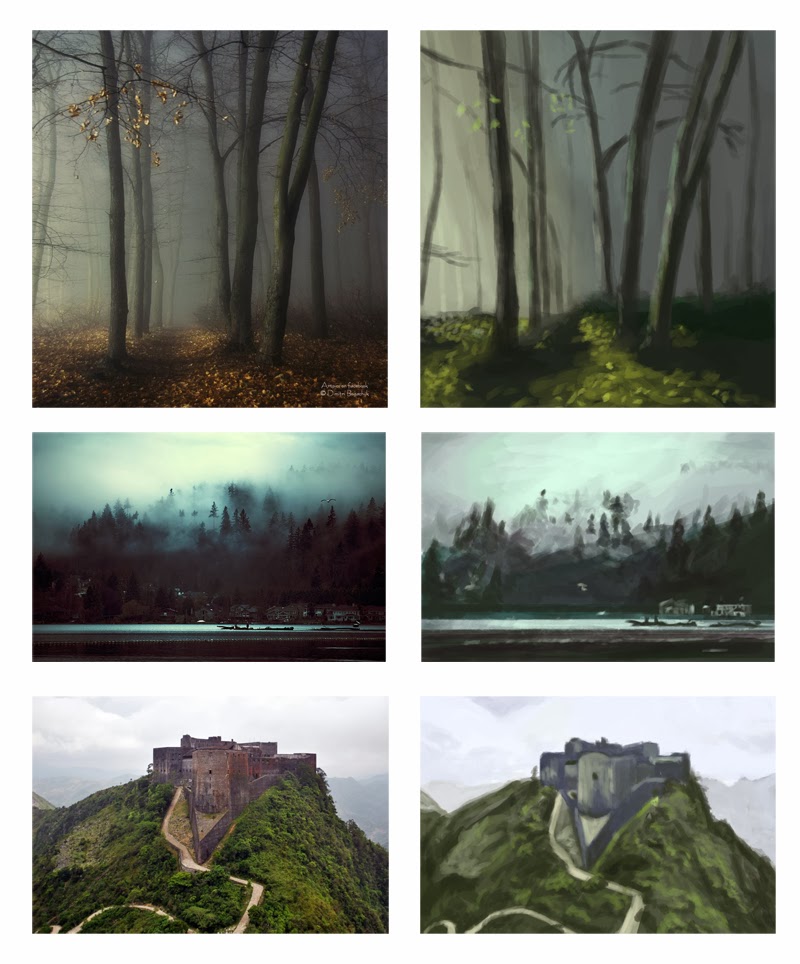
Title: Environment Speeds
Date: January 20, 2013
Medium: Photoshop CS3
Notes: Studying environments to +1 on them. Actually got this idea entirely from Lee Parks here. His are quite a bit better, but then I can honestly say that he studies environments far more than I do. Something that I should try and play catch-up on sometime soon.
It might not only help my characters from just floating in a space, but will most likely help my colors get closer to a more realistic palette instead of being quite off.
Here's Pinky, where's the Brain?

Title: Here's Pinky, where's the Brain?
Date: January 19, 2013
Medium: Photoshop CS3
Scale: Original is 1200px x 2000px
Notes: Yet again, more of those photostudies while listening to my madam read books. She's already on the third book of The Strain, and I highly recommend that people read it. It's AWESOME! :)
Edit: BONUS TUTORIAL!

Edit: BONUS TUTORIAL!
- Step 1: Render Background some, this will help you to define your 'character space'.
- Step 2: Sketch out the character in it's entirety (or at least what you plan to paint in later.
- Step 3: Wash layer. Basically throw a quick wash over what your want the basic backdrop colors to be.
- Step 4 & 5: Render, render, and more rendering.
- Step 6: Because I was a little unsure of all the crazy jewelry and add-on stuff this girl had, I made a new layer and just popped it up there.
As always, any questions, ask 'em in the comments!
Anatomy (from Imagination)

Title: Anatomy (from Imagination)
Medium: Pencil
Notes: So, from the last time you saw some pencils, I have tried that mouth technique using no reference at all and have discovered that I can draw a mouth in pretty much any way using that technique. So I tried continuing on with the full head and even some body, and discovered that I need to go back to the drawing board even more before I can just spit these things out from imagination. More studies of shape design for sure.


